
KashFlow integration with MailChimp – Email Newsletters

25
by Duane Jackson - Founder & CEO
on March 30, 2011
Our customers are used to having all of their invoicing and accounting tasks made really easy and they often ask us to recommend products that are equally as affordable, easy-to-use and well supported.
So when we recently started using MailChimp for our own email marketing we knew KashFlow customers would love it too. Until now when people have asked how to email all of their customers we’ve advised them to use the CSV/Excel download to import into one of the many products on the market.
That ends today with the release of seamless integration with MailChimp.
What does it do?
The integration between KashFlow and MailChimp gives you the ability to push all of your customer information (name, email address, number of invoices, total invoiced, etc) into MailChimps fantastic software.
Then, from MailChimp you can easily send emails to your customers. You can send newsletters to all of your customers, or offers to a specific set of customers (ie, all those who have spent more/less than a certain amount, those that have only bought once, etc)
Mailchimp give you a range of tools and reports to make the creation of these emails very easy and you can track who opened your emails and even who clicked on your links.
How much does it cost?
There’s no charge from KashFlow for using this additional service.
If you’ve got less than 2,000 customers and plan on sending less than 12,000 emails a month (that’s probably most of us) then there’s no charge from MailChimp either.
Getting up and running
All you need is a KashFlow account (get a free 60 day trial here) and a MailChimp account (get a free account here)
No technical knowledge is required to get the two systems talking to each other.
In KashFow, go to the Settings tab, scroll to the bottom of the page, click the MailChimp icon and follow the instructions on screen.
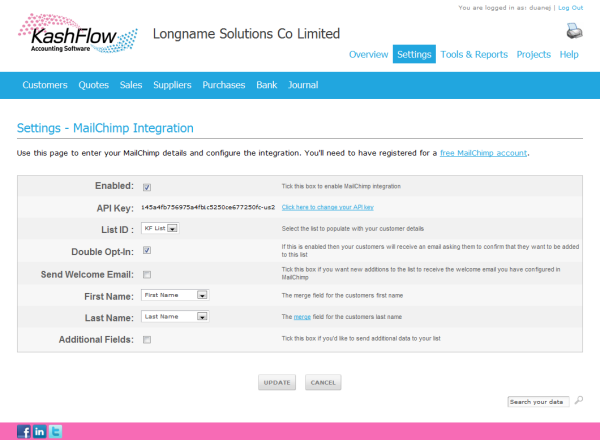
Once set up, you’ll be able to choose which “List” in MailChimp you want to send your customer list to and choose whther you want you customers to “double opt-in” to your list and whether or not to have them receive your automatic welcome email.
The drop-down lists are populated with the fields you have set up in MailChimp for the chosen list. So choose the correct field to store the first and last name of your contact and if required then tick the “Additional Fields” box to select which other fields you’d like to send to MailChimp.
That’s the configuration all done.
When you click “Update” you’re taken back to the main MailChimp Settings page and with a click of a button your customer data is sent into the MailChimp system.
All you have to do then is log in to your MailChimp account and get emailing. You’ll find the MailChimp site has lots of help and guidance on how to get the most our of your email list.
Give it a go and use the comments section below to let us know how you get on.
Enjoy!
25 Responses to KashFlow integration with MailChimp – Email Newsletters
-
There is an excellent iPhone app available for Mailchimp. It’s free!!!
-
Wicked Intergration, just like the paypal imports & the gavatar images for customer accounts. Next you’ll be telling me Kashflow intergrates with WordPress to take payments :-)
Well done Kashflow. I heart your accounting software so much, out all the products, software and web tools I use to drive my online marketing consultany firm forward. I don’t think I could live without Kashflow.
MailChimp is also one of my favourite e-mail marketing platforms too! MailChimp FTW!
-
Hi, please would you be kind enough to elaborate on this post. Does kashflow integrate with WordPress or not please? Yes it does? No it doesn’t? Development is pending.
Many thanks
John
-
Duane Jackson - Founder & CEO
There’s no pending development to integrate with WordPress, It’s not something I’ve seen often requested.
To be honest, I’m not sure where/how/why it would integrate with WP
-
-
-
This looks really good, i may give it a go. However i have a question. But please bear in mind i only use Kashflow to invoice, and i’m not the most experienced user.
In Kashflow i think i only have one contact and email address per customer, eg Bob in Accounts, it might be handy if i could have two or even three per customer, especially if i am dealing with a big company. eg ., Bob/accounts, Sally/marketing and Fred/the Director.Perhaps there is a function to add several contacts per customer, i’ve not checked.
Feeling tired today !! -
Mailchimp for free? Are you kidding me? That’s FANTASTIC! I was going to signup to Mailchimp and not only have you given it to me for free, you’ve essentially turned Kashflow into a CRM database, much needed and HUGE value! I can’t wait to play around with MailChimp, and I am sure my customers are going to love the professional cool new newsletters they get from me! WELL DONE!
-
Well done guys! I’m in process of setting this up and if it’s as good as it sounds to be this is an absolute cracking new feature.
I hadn’t used mailchimp before but after an hour of playing around I am already in the process of moving my aweber subscribers, not only that, I can cancel my aweber subscription!
-
One question I forgot to mention..
When linking kashflow and mailchimp for the first time, will it automatically go through my customers and send an opt in request? I had the double opt-in ticked.
-
I’m very pleased this is being so well received.
@Craig – yes, if you have tikes double optin and they aren’t already on the list then they will be asked to confirm (ie, opt in)
-
Thanks Duane,
Figured it out in the end, can see the e-mails are being sent out for opt-in requests,getting some sign ups already, brilliant stuff.
Happy to recommend it to anyone – just another great reason to choose Kashflow :-)
-
Have been using mailchimp since November 1997 and it is an excellent system… but if i can get it free here how do I go about transferring across to take advantage of that offer. It’s easy enough to reload the addresses, but you’d lose the subscription history which could be important if you are reported for spamming, and you’d also have to rebuild templates…
-
btw just remembered the date – this isn’t an April fool’s jape is it…?!
-
Hi Rupert. No April Fool – this was published on 30th March : )
If you have less than 2,000 subscribers and are sending less then 12,000 emails per month then it sounds like you’d qualify for the free plan. Contact MailChimp support and ask them.
-
@Mark, no – no function do that yet. We may well add it in the future, but it won’t be in the immediate future purely because it’s not commonly asked for.
-
Great news! I use mailchimp for my newsletter system anyway and integrating with Kashflow is just perfect especially for special offers :)
-
Check your Kasflow records before auto export to Mailchimp. Discovered that contacts before the change in kashflow feature of Title, first name and last name are showing empty details in first name (or only the & when I used Mr & Mrs) which results in empty first name in Mailchimp.
Great extra feature Kashflow, thanks. Another reason to promote it to other small businesses who still not realise how important it is to regularly keep in contact with existing clients.
-
This is fantastic as we have been using mailchimp for about 2 years and now can use Kashflow as a CRM.
Excellent work Duane !!
-
Kashflow – Duane you have absolutely transformed our business and subsequently our life! Kashflow ticks all our boxes when it comes to accounting and business software! Just when we think it can’t possibly get any better … It does!!!! I’m spreading the word Down Under in Australia. Christian Cole Furniture looks forward to a succesful future with you.
Kind regards,
Christian Cole
Christian Cole Furniture. -
Kashflow – Duane you have absolutely transformed our business and subsequently our life! Kashflow ticks all our boxes when it comes to accounting and business software! Just when we think it can’t possibly get any better … It does!!!! I’m spreading the word Down Under in Australia. Christian Cole Furniture looks forward to a succesful future with you.
Kind regards,
Christian Cole
Christian Cole Furniture. -
Great feature. The sync fails however for those clients with multiple email addresses.
-
Will you let me know if you sort out the multiple e mail address thing please – otherwise brilliant innovation, thank you. we’re a new user but thebestofhammersmithandfulham already loves you!
-
Many thanks for adding this new feature. Adds value to Kashflow and is a welcome addition.
-
Pingback: KashFlow Accounting Software Integrates with MailChimp | MailChimp Email Marketing Blog
-
Hi,
I am looking for some experts in Capsule – Kashflow – and integration with MailChimp to do some consultancy work for a printing company. Please drop me an email. Thanks Erik.
Leave a Reply Cancel reply
Authors
Duane Jackson
Ramblings, Small Business, News.
Stu Bradley
Marketing & Communications
Katie Poole
Community Management
Patrick Johnson
Design & User Experience
Iain Farquharson
Tech & Project Management
Guest Authors
Insights from Others

I was using MailChimps for quite a while for our newsletter and I use Capsule CRM as in between tool to send all contacts from KashFlow to MailChimp. Now this is great if you do not use Capsule CRM.