
The Support Dashboard
4
by Duane Jackson - Founder & CEO
on September 15, 2010
As our customer base as grown substantially this year, and continues to do so every month, so does the demand on our support team.
I needed a way to be able to closely monitor the current state of support without having to continuously log in to the support system.
So what we came up with is the Support Dashboard. This is displayed on a big LCD screen perched on top of a filing cabinet that’s visible from everywhere in the office. Visitors to the office always comment on it.
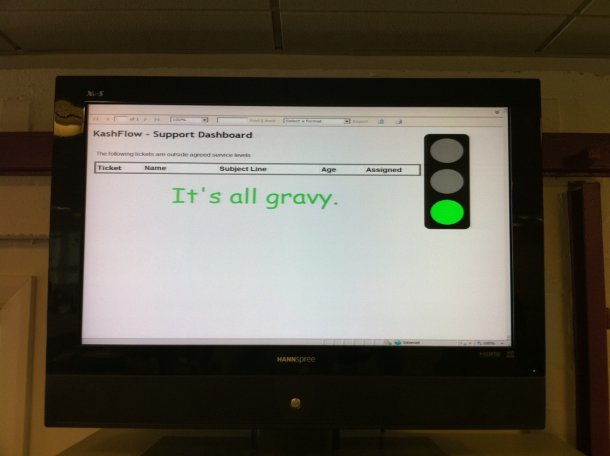
A green light means all is well.
An amber light means someone has been waiting for a reply to their support ticket for more than 30 minutes.
A red light means someone has been waiting more than an hour – if it ever goes red then it’s all hands on deck until it’s green again.
As you can see in the photo, it’s currently green. But when it goes amber or red it lists the ticket subject line, how long the customer has been waiting and who (if anyone) the ticket is assigned to.
For those that care about these things – the support ticket system is eSupport from Kayako and the dashboard was magic’d up by Tim using SQL Server Reporting Services. The choice of the Comic Sans font was also Tim’s. So please aim flames in his direction, not mine.
4 Responses to The Support Dashboard
-
I love it! This really shows that Kashflow put a lot of thought into making sure their customers are always happy. I’m inspired to design a ‘Ting’s be good’ indicator for our software backend! Paul, 1DayLater
-
Good stuff.
What are the chances that we customers can login to the support system so we can follow the whole thread of any issue?
Thanks -
Please remove my last comment, you already do this, it’s just that after 8 months I’ve never needed to ask for support until now, in fact not even support but a suggestion regarding having ability to add more than one contact per customer account.
Leave a Reply Cancel reply
Authors
Duane Jackson
Ramblings, Small Business, News.
Stu Bradley
Marketing & Communications
Katie Poole
Community Management
Patrick Johnson
Design & User Experience
Iain Farquharson
Tech & Project Management
Guest Authors
Insights from Others

I like it. We use an app called CruiseControl.NET as part of our development cycle and from my point of view (architectural), it gives me a red/amber/green status in my system tray – very handy when managing a distributed team.
Means I know what the state of the current development version is at a glance – I’m certain we’ll be implementing something similar for support in the near future – forewarned is forearmed!