
Automated Credit Control for All

If you’re using KashFlow for your accounting and invoicing then you’ll be used to your accounts being highly automated so that you can get on with running your business.

We’ve just released a new feature that automates the whole process of Credit Control.

You can automatically email your customers to remind them that an invoice is about to become due. And if they don’t pay on time then more emails can be automatically sent to harass remind them about it until they do pay.

As you’d expect, the feature is highly configurable: Create as many emails as you like, saying whatever you like, going on whatever day you like at a time you choose. Have the emails BCCd to yourself and a note automatically added to the invoice.
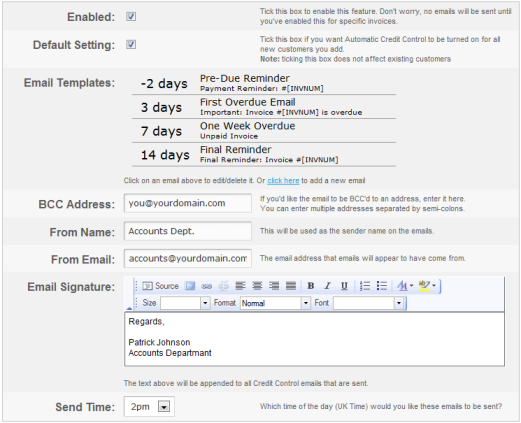
Oh, and of course you can include a link in the email for the customer to click and pay you straight away. Once they pay then the invoice then your accounts are automatically updated to reflect the payment.

Enable the feature in Settings -> Automatic Credit Control and watch your cashflow improve significantly.

All you need to worry about is what you’re going to do with the time this frees up.

If you’ve not yet discovered how much better life is when you stop struggling with bloated confusing accounting software then take a free trial of KashFlow now. No card details needed – if you don’t like it you just walk away.

Duane Jackson - Founder & CEO

As Founder and CEO of KashFlow, Duane writes primarily about the trials and tribulations of starting and growing a successful business. Having handled KashFlow’s PR internally for so many years he can’t resist writing a bit about that too.

Share this article

  • Paul

    This is awesome! Go Team KashFlow!

  • http://twitter.com/goldfigure Jeremy @ GoldFigure

    Finally – I have been able to send out reminders with ease for ever (since KashFlow AD) but now I should spend some time re-wording my reminder letters and start relying on my financial nanny to go and do the chasing for me.

    Hmmm… this means I need to take greater care to mark payments received every day lest I send out some automated shitty letters when they are not warranted.

  • Simon

    Awesome – many thanks from Unitycomm :)

  • Darren @ CTS Electrical

    Finally – Thank you KashFlow! This saves me sending out statements and reminders at the end of every month!

    Shame I had to go through all my pre-exisiting customer records, but it gave me a good excuse to look through each of their notes and re-evaluate each client.

    Now firmly in place for all new customers – so beware!

    • http://twitter.com/DuaneJackson Duane Jackson

      You’re welcome!

      Based on feedback, we’ve now added tick boxes to enable it for all existing customers/invoices. Too late for you, but hopefully helpful for others

  • Matt Chatterley

    Excellent work – thank you! I’ve always been a vocal advocate of sending “pre-minders” for invoices and being able to automate them – as well as reminders – means one less job for me to do in the mornings. It might only save a few minutes of time here and there – but that quickly adds up!

  • Gavin Henry

    Always used http://www.getting-paid-system.com/ for KashFlow. Same?

    • http://www.kashflow.com Duane Jackson

      Yes, pretty much. But without the price tag.

  • Ed

    This is a great little system. Some comments on functionality which would be nice to see…

    - option to exempt certain customers. Some of our clients are super organised and don’t need chasing. More likely, we’ll be late marking their payment onto the system. Others pay us on a fixed day every month, so sometimes they pay a bit early, sometimes a bit late. We don’t want automated emails going to them.

    - option on the invoice screen to exempt particular invoices. Sometimes we take preorders and don’t want to chase for something we haven’t sent.

    - option to exempt invoices where the payment date is the same as the invoice date. This is usually our imported web sales. We don’t want to chase them. GettingPaid offers this and it is quite useful.

    - option to exempt invoices under a certain value threshold. If there’s a balance on an invoice because of an exchange loss or rounding issue, we will be writing this off, and don’t want to chase for £0.01!

    - Does this work with multi-currency? The invoices only send out GBP values last time I checked and we don’t want to chase for invoice amounts that aren’t familiar to the clients.

    • http://twitter.com/DuaneJackson Duane Jackson

      Hi Ed,

      It’s already off-and-onable on a per-customer and per-invoice basis. We tried to make that clear on the set-up page but I guess we haven’t made it clear enough.

      As for the other stuff – not yet. But, like everything in the software, it will be improved based on feedback.

      • Anonymous

        OK – you need to enable the system before you see the options to include / exclude. Should have looked a little harder.

        It would be good to have some logic functions so that we can set-up rules that automatically capture the invoices we want to chase.

        We’ll probably use it for now with the manual settings.

  • Nicola, Gbiz IT

    Excellent! One quick question – with the invoices, we have the “Pay Now” option turned on, and in your blog above, you say we can add a link to the reminder emails for them to click and pay immediately which will then automatically mark the invoice as paid. How do we do this, please?

    • http://twitter.com/DuaneJackson Duane Jackson

      Hi Nicola,

      Enter [PERMALINK] in the email body and it’ll be converted to a link to the invoice. When they click the link it’ll show the invoice with the payment button.

      Alternatively, just enter [PAYONLINE] and it’ll be replaced with a link direct to the payment page.

      • Nicola, Gbiz IT

        Thanks, Duane – your very speedy response was much appreciated :)

  • http://www.integralcm.com David

    How about adding a diary system at either customer or invoice level ? This would enable credit controllers to make follow up calls , send letters etc without the need to keep a separate log. Would also be nice if the text of any auto emails could be added into the notes.

Try KashFlow free for 14 days and you'll never look back. Promise.